Welcome

Over the last several years I've been dealing with various stages of disability thanks to ALS. My goal is to share solutions and review various products/tools/devices that I have found particularly helpful.

Wednesday, 8 October 2014

The Pilot's Modular Knee Board

I'm finally back for another, much overdue blog posts! My apologies for being away so long, it took some time to reorient my technology needs after the broken arm. I had to acquire a Windows surface and a tobii eyetracker , consequently I have been occupied With setup and configuration.

Now that has been said, on to the meat and potatoes of this article :-)

A while back I picked up a pilot modular knee board on from CP gear. The idea was to find a way to things like my iPhone and ID for adapted transport visible and easily accessible. One of my criteria has always been to minimize the amount of stuff in front of particularly things like tables attached to my wheelchair. That said, I will admit right at the
beginning that it didn't work quite as I had envisioned. But on occasion it has been extremely helpful.

I do pilot my wheelchair... right?
So I obviously need wingmen... right!
Most recently, I've been using it for things like grocery lists and managing my paper work at the hospital. These days, I usually get off at the hospital and left on my own as I can still communicate and get around quite well wheeled 2.0 I don't need an assistant following me all the time. So we start my iPhone to the need knee board along with my hospital cards. This allowed people to easily access what they needed, with my supervision and not rummaging through my bag. Kept everything nice, organized and easily accessible.

By sticking my iPhone to get on a band of Velcro tape I was also able to (relatively) easily maintain text message communication via Siri while I was there.

The board is comfortable to wear (with pants. With the shorts…meh!) on either leg and stays put quite well.  It is attached by a pair of Velcro loops that you close around your leg.

Personally, I quite like and I would say it is well worth the cost of C$50. It comes in one of three colors. Black, e Pat camouflage and optionally has a bunch of accessories that can be velcrod to it. Other pouches for example.


And a huge thanks

I would also like to give a shout out to William Cassan for his incredibly generous donation to this blog. It is greatly appreciated and will go to financing the exploration of other useful tools :-)

Wednesday, 20 August 2014

Eye Tracking, Windows Surface & a Broken Arm

If you've been following this blog for some time, you note that have been anticipating the lack of use of my hands and have been looking for solutions to allow me to continue to access my computer. For some time now I've been keeping an eye on the PC eye go by Tobii (see what I did there?) And I've been pushing my rehab facility to look into it.

Now, my rehab facility had access to one of the earlier Tobii eye tracking computer solutions but it was prohibitively expensive and not to the usual computer standards I am used to. Ringing in at about C$10,000. So once I knew about the Windows surface and the PC eye go, for total of about $3000 I was pushing my rehab facility pretty hard to get one for trial, which they recently did. And fortunately, I was the test case for it. As a matter of fact, I'm using it right now in conjunction with Dragon NaturallySpeaking. I did try Windows speech recognition which is functional, but frustrating as this comprehension was not nearly as good.

yeah, that hurt
The goal of the evaluation was to find out how easy it is to use for my day to day computer needs and how easy it is to keep calibrated. Also evaluating any physical demands it places on me. And unfortunately, my evaluation turned into a far more realistic experience than expected as about two weeks ago I fell and broke my right arm in four places. Three and the rest, one in the shoulder. Eliminating the use of my hands and any ability I had remaining to access my desktop computer. I immediately became dependent on the eye tracking.

That said, broken arm and all I have to say I'm extremely pleased with the eye tracking experience. In particular I'm glad I had it on hand after the fall (see where they did there?) As without it I would've had zero computer access. Once I figured it out, it is very easy to keep calibrated. However I do have to point out it is very sensitive to changing lighting conditions. For example in the evening when the sun is setting and the lights in the house are going on. This can really wreck calibration. So as lighting conditions change you may have to frequently recalibrate. But, if you do this often enough as you start noticing changes in the precision. It's not that big of a deal. However if you wait too long, functionality can be completely lost, in my case I have to ask for help to push the on-screen buttons.

After calibration, there are two primary ways you use the eye tracking to interact. Via mouse emulation which I don't particularly like and gaze selection, which is awesome.

Mouse emulation actively tracks ways you working on the screen and moves the mouse cursor accordingly. This can be quite frustrating as they can be a little "drift" between where you are looking at where the cursor is. This results in chasing the mouse cursor across the screen. Needless to say, annoying. Secondly, to send a click you have to dwell where you want the click that happened. A.k.a. stare at it. Now as your eyes are always making slight movements, even when you think you are fixed on a particular location this can be just enough to prevent selection from happening. And then added to it the tendency to look at the cursor from problem number one… Again annoying.

That said, it does work and it does have its place.

Now the gaze the selection is really great. There is a bar overlaid on one side of the screen which you look at to select the desired mouse function, and then you look where you want that action to happen. It also has its own on-screen keyboard which takes up about half of the screen. This may sound like a lot of screen real estate, put on the tablet it makes the buttons not that huge. But the are extremely easy to look at and type with.

I had a few issues with keyboard layout, just for my habits of typing and the tendency to want to do some programming/scripting but all in all it's very functional and very responsive. It is of course slower but if you're using it in conjunction with Dragon naturally speaking. Very pleasant experience. The eye tracking keyboard by itself is perfectly functional for shorter replies to e-mails, Facebook and twitter updates and so forth.

Using VNC & eyetrack to remote
connect to desktop to use Dragon
One of the things that have appreciated the most, is using VNC to remote connect from the tablet to my desktop. This is been extremely handy (see, did it again). Using the eye tracking on the tablet as essentially the mouse to access some specific programs and functionality I had on my desktop.

I would have to say there's only two things about the gaze selection I had issue with. The first off, is there is no auto completion reword expansion built into the on-screen keyboard. Even the default Microsoft on-screen keyboard has this as an option. As you're essentially hunting and pecking one letter at a time to type. This would've been an extremely useful addition. It is however easy enough to install a third party piece of software such as wordQ to add this functionality. And then add a little auto hotkey script on top of that for easy access (just so you don't have to turn the keyboard page to access the number pad)

The second thing has to do with the built-in scroll tool. While it is perfectly functional, it is a little frustrating to use when scrolling through say and longer webpage. Use for example have to look at the bottom of the screen while, at the corner of your vision keeping an eye on the top of the screen to know when to stop scrolling. He really needs a page up/page down button. This is something that's also easy to solve with auto hotkey scripts, as a matter of fact, already written and tested.

I also tried plugging the tablet into my windows of seven desktop with a 22 inch monitor. The functionality was nearly identical with some changes due to Windows 8 Metro interface not being present. It was again extremely easy to set up and calibrate, and of course had been the much larger screen made selections extremely easy as I had much larger look targets.

All in all, I'm extremely pleased with the Windows surface to Pro tablet and a Toby eye tracking functionality. And, seeing as the fall has pretty much put an end to the use of my arms and hands in any functional sense for computer access. I am in the process of ordering one. I am however a bit undecided as to whether or not I want to order the Windows surface Pro three.

One thing to consider however is that on battery power the Windows surface 2 Pro with the eye tracking plugged in is only given me about 2 1/2 hours of power. Not that big of a deal, but you do have to keep it in mind.

Also, if you're anticipating the loss of the function of your hands. I would suggest it's worth acquiring the eye tracker (perhaps not the tablet right away) and becoming familiar with it earlier rather than being pushed in at the deep end. Before I broke my arm, I had a few occasions where it needed to interact with it manually. Particularly when I was learning about the calibration.


Monday, 21 July 2014

Another tweak for the Griffin Beacon

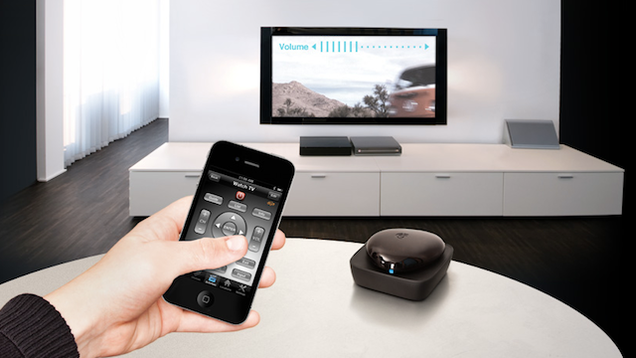
I've talked about Griffin Beacon before. It's a great way to control your to television and PVR from your iPhone or android device. But as we discussed it does have a few issues. We talked about a result the battery consumption issue but the one remaining pains in the butt is that the device will go to sleep if it is been without Bluetooth communication to your device for over an hour.

So if you come back from having left the house safer groceries and doctors appointment or something. The device is off and there's no way to wake it up without touching it. And sometimes, my helper leaves before I realized the place has been turned off. Needless to say, without the function of your arms or a stable ability to walk this is a problem.

So it occurred to me that after the move I had an extra controller for my Vera home automation which was no longer being used. So I thought, why not plug my hacked Griffin Beacon into the control switch? This way, using my iPhone I simply have to cycle the power to the beginning. When the power comes back on, the BK wakes up in searches for my phone. Automatically connecting.

BOOM! Problem solved.

The downside to this is that the typical Vera visual switch runs about $40-$50. So it might not be the best solution to run out and buy one. But in my case, it was no longer being used so this worked out perfectly :-)

Sadly however, it would seem the grifin beacon has been discontinued.

Wednesday, 25 June 2014

Looks like Siri Proxy Is Dead & Bit of an Update

So where have I been?

There's been quite a bit of chaos going around recently. For a couple reasons, in no particular order:

The family has been heavily wrapped up with moving house as I'm not able to navigate stairs safely anymore. As always, moving house is always stressful and annoying. But what is really unfair about it, all the work is falling on the shoulders of my wife.

Discovered a nice apartment that would work for us and be rather accessible right from the start. Nonetheless, we will be sad to be leaving this home and neighborhood. We love it, and our neighbors.

Please join me when I say "I hate moving"

I lost a considerable amount of use of arms hands since our last post. Making everything, difficult. This is necessitated an increase in volume of people coming through the house to help me out, leaving a very limited amount of time to get to the computer. When I do, those two or three hours are often taken up with correspondence, reading or World of Warcraft hearthstone…

Ah crap... more wasted time with watercraft
It's nice that I found a video game I can play again, but damn you World of Warcraft! I thought I was free of your corruptive influence. Damn you back to the depths of hell!

The lack of use of my hands has also greatly limiting my creative problem solving for day--to-day issues as I can't really use any of the solutions anyway. This means I'm going back to more work in front of the computer, which has been slow for the above-mentioned reasons ;-)

On the flip side, my rehab facility has given me access to a Windows surface tablet with a Tobii eye tracker. That has been quite interesting and we are laying the groundwork for when I will need one.

The death of siri proxy

About a month ago at WWDC Apple announced the release of IOS 8 and at about the same time appears to have patched their guzzoni service on which Siri proxy
relied. My Siri proxy stopped working, I tried on and off for about three weeks to get back up and running with no luck. It's dead.

Such a shame, it was awesome while it lasted. However, IOS8 is promising to open up the SDK for Siri with home kit so that may be used for various home automation's solutions.
(Crosses fingers)

So I upgraded my phone to IOS7 and started to look at alternatives.

Obviously, there is nothing as good out there right now but I needed a way to verbally, remotely lock and unlock my door. The easiest solution was to use my always on raspberry pi to check my Gmail account for messages from a specific center with the specific catchphrases.

With a bit of research I managed to write a Ruby script. I Chose Ruby because of the convenience of regex matching and the familiarity I got writing scripts for my Siri proxy.

The script is not fancy at all. But it does get the job done. It works with the following logic.

  1. Every 30 seconds checked my Gmail account
  2. is there an unread message from a specific e-mail address
  3. if yes, does this message contained trigger phrases?
  4. If yes, do specified action.

If you like to give it a try, you can find the Ruby script here my Gmail checker

You will however have to install the Gmail gem http://rubygems.org/gems/ruby-gmail

The way this script is presently written, it runs just fine on raspberry pi. but not on Windows. However, it should not take much to get it running on the Windows machine. I just did not figure out the syntax to send the string to Wget.exe on Windows. For your convenience, I included it in the zip.


Tuesday, 6 May 2014

That's One Fine Coat

One of the ongoing problems I've been continually trying to address is that of comfort. With the extension of atrophy in my arms, which are essentially skin and bones these days. I'm finding that propping my elbows on pretty much anything can get rather uncomfortable rather quickly. Including my wheelchair.

I looked up all sorts of elbow pad options in the past, these tend to be rather tight fitting around the arm making them happy and not terribly comfortable to wear. Not to mention hot. The gel filled elbow pads were particularly bad for heat. Not to mention they were rather heavy. I will admit, they worked rather well.

Velcro insert pockets
on the elbows!
The other day while rotating around the Internet doing some window shopping for a light coat to replace the one I have I stumbled across the tac.u Coat from propper. It's basically a military style field jacket. But what is interesting about it is it has Velcro insert pockets on the elbows. Allowing you to insert elbow pads, or in my case a thin sheet of high density foam. The foam is very lightweight and being only half an inch thick makes it rather flexible. This is just enough padding to add an extra layer of comfort and take the sharp edges off of whatever I'm putting my elbow on.

The jacket is available in all sorts of other military colors/camouflage and is quite reasonably priced at US$40. Myself I chose the black one, but I do have to admit. The subdued urban camo is pretty cool.They are easy enough to find on Amazon.com, eBay and various tactical websites. I ordered mine from ACU.com which seem to offer the best shipping rate Canada.

On a side note, one of the fun things about the Coat is and has all sorts of Velcro patches on the shoulders which are intended for military badges and insignia. However, we've taken a bunch of Velcro tape and stuck it to some fun things/toys from my Four year old boy to Stick to me. Including the back of my iPhone. He finds it rather hilarious to watch YouTube while it stuck to my shoulder.

As limiting as I am in the way I can interact with him, got to find ways to be creative. And this that means looking a little silly, so be it! ;-)

All in all, so far I quite like the jacket. I should point out however the slaves are quite baggy. I ordered a large, which usually works out quite well for me. However in this case it turned out to be rather loosefitting around the chest. I probably could've done with the medium. But it does make for very good spring jacket.


I would also like to just take a second to send a big thank you to Albert Wojciechowski for his contribution to this site :-)

Thursday, 20 March 2014

Status report

You've probably noticed that I've not been posting much recently… My apologies for that, I do have a backlog of topics I want to get around to posting, but it's becoming increasingly difficult for me to do so.

I seem to be crossing a number of tipping points which is making things much more difficult for me. In particular, my balances rather severely affected. I can still walk, but am prone to falling. This is probably the biggest reason I've not been posting much, as I spend my days on the ground floor and my computer is in the basement. Stairs are scary!

The bandage they gave me
was a bit oversized.
I don't have much use of my arms and hands at all anymore which I'm going to say is probably the biggest reason why my balance is shot. No arms, no balance. As a matter of fact, I took quite the fall the other night. I was standing behind my son while he was brushing his teeth for bed. For some reason for right knee buckled and I fell backwards clipping the edge of the toilet with my right eyebrow. Leaving quite the boxers scar About 1/2 inch long. My four-year-old was very good about it and just asked why I had a hole and was leaking. Got lucky on that one though. Another inch or two towards the toilet seat and it could've been much worse. Ending up with more than just a "sexy scar" for the ladies.

My speech is just starting to be affected, just enough to start messing with my voice recognition. I'm also finding I'm speaking more softly, mumbling and having to repeat myself more. Fortunately my voice bank is all ready to go. Hopefully I won't need it for quite some time.

Steve Gleason Super Bowl ad for eye tracking
with Microsoft surface
Between these two issues, I'm starting to seriously consider alternative computer options For you zero, constant access. I've been monitoring Tobi eye tracking for some time, which is the solution I think I will go. They have a nice package for sale with the Windows Surface2 & Eyetracker for about $3000. Expensive, but the prices came way down from where It was.

That being said Tobi has a partnership steel series gaming trying to bring eye tracking mainstream. These are due out this summer,  should drive the price down even further. Going to try to hold on until then…

But! Still rolling!
With everything that's going on, and the balance issues the wife and I have been looking to move. We find a place that should work out for us. I ground floor apartment with elevator access from the garage. This should at least give me more in the way of computer access. Took a long time to find a good apartment that would be good for the family, accessibility and my mental health. But finally found one. We just put our home up for sale.

We both hate to move. We love the neighbors and the neighborhood fortunately however we are only moving a few blocks.

So until the dust settles sometime in July, I don't expect to be able to spend much time in front of the computer. But please, feel free to follow my daily adventures on twitter until then.

Wednesday, 29 January 2014

Milwaukee battery powered heated jacket.

Jacket heating zones
Back in the fall, my father had his birthday and he's a bit of a wimp with the cold. So we thought that would make a cool gift to try to buy him the Milwaukee battery-powered heated jacket. Especially now that he will be spending more time Montréal and it's a lovely winter climate.

As winter arrives, he loaned it to me to try out for a few weeks as he was going to be away and I needed to go collect my son from daycare in my wheelchair (with the help of an assistant).

Winter has posed to serious issues for me, And sometimes you absolutely need to leave the house to attend appointments or whatever.A

First off is due to the amount of muscular atrophy, I don't have as much muscle mass to keep one. This my core body temperature is at risk of dropping much more quickly.

It would seem winter is getting a bit out of hand here in Montréal
Secondly, and is apparently a fairly common issue for people with ALS is the cold can really exaggerate muscular spasticity. I have found that on occasion, being outside at -15 or less (And this year we've had cold snaps down to -40 before Wind chill!). Even for a very short duration, say transiting the distance from house to car of around 40 or 50 feet can be enough to trigger a rather serious reaction. To give you some idea, on Christmas Day we visited my wife's parents place for dinner. When they left the house around midnight, I had to walk a very short distance to get to our warm vehicle. By the time I made it from the door to my vehicle, the muscles in my jaw tightened to the point that I could no longer hold my mouth. I had to talk soon my teeth. And my legs were stiffening up to that point I could barely walk.

The most annoying about this, is my body starts reacting this way and as though I have hypothermia. But I don't feel cold at all… Once everything warms up, I'm okay.

The jacket works as advertised and has three heating modes. When set for high, the heating zones actually do get quite warm (but comfortably so) for a duration of up to 4 hours. But I'm finding consistently of the less, closer to three.

The jacket is not constructed as a winter jacket. I would say more of a spring or autumn jacket men's for the person that works who is someone physically active in the cold, humid environment. The biggest issue I found using it as a winter jacket is it did not have a sufficiently good windbreaker. Once we got down to about -10°C, the call would go right through the arms and the non-heated areas. He really does require a shell.

Flame on!
We tried removing the lining for my present winter jacket (shell) and using this jacket in its place. While that works quite well, between the weight of this jacket and my winter shell. I found it to be quite heavy, and I was unable to move my arms, and as you know, my arms are suffering from significant atrophy. But with the shell on, want wise it was much more comfortable.

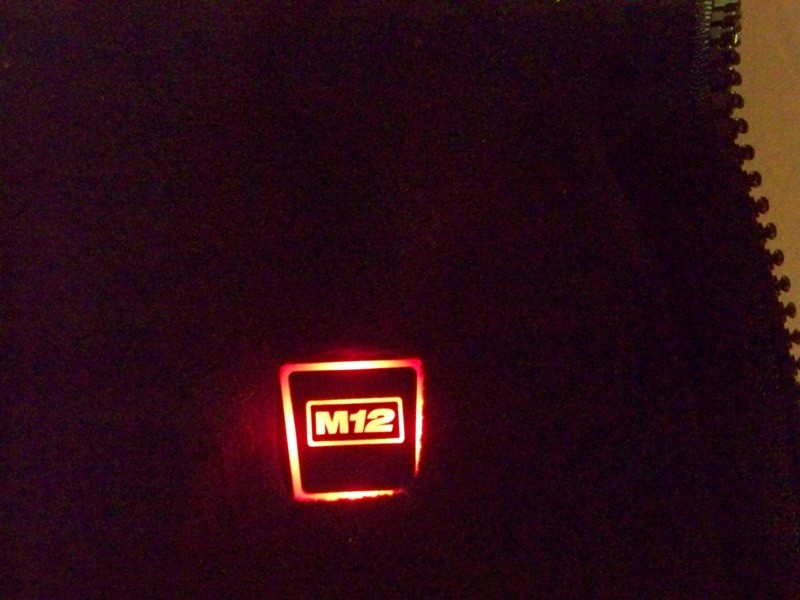
The temperature was controlled by the power button located on the left lapel. We push and hold for 4 seconds to power on, and when ready to go it lights up. Due to the placement of the button, and the difficulty of pushing it, I am unable to actuate it myself. I require assistance. But those light up quite bright, and my four-year-old finds that be pretty cool. :-)

The jacket, complete with the charging unit and one battery retails for about C$200 at Home Depot. I find this to be quite well priced in the jacket is very well made. But unfortunately, because it didn't need to use my shell over top of it I can't justify going to buy one for myself. It doesn't quite suit my needs, as matter of fact it complicates things a bit.

That being said, they do have a hooded jogging suit version which is much lighter and retails for C$150. I think this might suit my needs much better, It should be sufficiently Lite that would fit well in my existing winter jacket with the liner. It should not add as much weight or inflexibility. I plan on trying this out.