Welcome

Over the last several years I've been dealing with various stages of disability thanks to ALS. My goal is to share solutions and review various products/tools/devices that I have found particularly helpful.
Showing posts with label outside the box. Show all posts

Friday, 22 May 2015

Beating the Cold with Snug Pack Poncho Liner

Yes, I know. It's almost June and spring is here. Thank God winter is over. Obviously, this particular post is a bit overdue.

One of the biggest frustrations I had with trying to keep warm in the wheelchair was that no matter what we did or what I'm warm. I would still get this cold draft coming up from the small of my back. In addition, I would very often feel the cold for my jacket rather quickly around my shoulders and upper arms. Even though my Milwaukee heated hoodie was working great. It couldn't help with some areas.

Notice how open the back and sides are
Drafty!!!
So I started looking at poncho ideas. Obviously the first ones I looked at were wheelchair ponchos. These looked okay but seem to be more have a cover for the wheelchair occupant that covered the legs arms and top of the back wheelchair. They kind of tapered towards the front E.g. Long enough to cover the knees on the front, but only just past the shoulders on the back. Would do nothing to keep the back warm.

That and it also cost upwards of $200!

… Not to mention that you look like a fashion reject from an old folks home.

Start doing some shopping around I found the snug pack poncho liner. Usually priced around $100, but I found it for about $50 on Amazon.ca (the price has since changed)

It is extremely light, huge and surprisingly warm. It is insulated with the material called travel loft, similar to prima loft. It's not really rated for the deep cold, only to about 10°. But as an additional layer. It works extremely well with all my other winters got. I was outside for long periods (well over an hour) at less than -20°C. It made all the difference.

It is meant for some pretty hard-core outdoor type activities and the military. So the back of the poncho is really quite long, designed to go over a backpack. What this means is when you put on and then sat down in the wheelchair, it covers my back all the way down to just about my knees. Using the poncho, I never had that cold draft going up my back.

It is windproof and water resistant. So by itself, I would not use it in the rain (it is intended to go inside the enhanced control poncho) but I wouldn't worry about it in a light drizzle.

Putting it over top of my winter coat and tucking it down it worked great as a windbreaker and greatly improve the cooling problem I was having on my shoulders and arms.

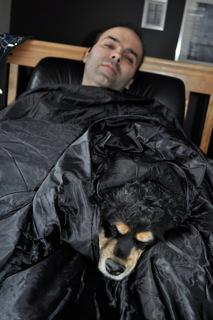
my dog found the hood to be
pretty great
It is really easy to put on and big enough that if you so choose you have more than enough to cover the headrest and the back of the wheelchair yet of talking in. The hood is also great, it tightens up fairly comfortably to help keep out the draft.

I have also used it as a regular blanket around the house to keep warm. In less extreme temperatures I had even just use the poncho without a coat. It's been quite convenient.

I am very happy with the purchase, it does a great job.


Wednesday, 14 January 2015

Beating the Cold with Milwaukee's Heated Hoodie & Camping Slippers

Seeing as it's freakishly cold here in Montréal right now, swinging between a balmy -20°C and -40°C. It seemed like a good time to introduce a proper Canadian tradition, the good old the Canadian "two-fer". As in two for one… But sometimes also applies to a case of 24 beer… Sorry kids, not that one. ;-)

Before hoodie...
Around about this time last year, you may recall I posted an article about the Milwaukee heated jacket. While the jacket was very good, it was just not quite right to replace a winter jacket. The big issue lies in the fact that, by itself, it was quite warm enough. Especially in the arms. So I would find I had to put on another layer between my skin and the heating elements, which in turn reduced the effectiveness of the heating element.

This is where the heated hoodie is really great. The material is made from is basically like a jogging suit. But a bit heavier, so it's quite warm as is. It has the same heating elements and functionality as Milwaukee heated jacket. But, being a hoodie . I find I am able to put on a regular T-shirt (sometimes longsleeved), hoodie and then my regular winter jacket. And this combination works out really quite well. Beginning elements of liberty are brought much closer to my skin and consequently have much more affect. This also means I can run it on the lower setting and still have a similar effect. Usually, when I first leave the house I turn it on medium. Only posting at the high after I have been out for a while. Needless to say this extends the battery life by about an hour.

I should however mentioned that I've only tested this off to about -20. I have not tried going out in colder weather. Mostly because the sidewalks are not that clean. Makes it hard on my neck, and is a real mess in the house afterwards.

If I have to say anything against the hoodie, is that the battery pouch is a little bit awkward. In the jacket, it's a nice tight pocket. They keeps the battery in place and consistently oriented in a vertical fashion. The pocket in the hoodie is much larger and looser, causing it to travel in more of a horizontal position. Which can sometimes get in the way when sitting down. It is usually easily adjusted to fit in the void of my wheelchair back. Also, unlike the jacket the battery pouches on the inside of the hoodie. Meaning that if you have to change it, you have to open the hoodie up. This is not an issue for me yet.

After hoodie...
One item I've been looking at is an extension wire for the battery. That way I could leave the battery in the pouch on the side of my wheelchair and easement. The changeup while I'm out. However, I have only found one with a car adapter. Not only did it yet, so I'm not too sure if we will suit my needs.

So all told, the heated hoodie is great! For the price of the $150 (including the battery and charging unit) At Home Depot.ca (Pro tip: I found it to be about $20 cheaper in-store than online) it's kind of like wearing a portable electric blanket. It comes in four colors: Black, gray (I have this one), khaki and special edition red. If you have a disability that impairs your ability to keep warm, get one! Well worth the money.

I have also been wearing a pair of down camping slippers quite a bit. The original idea, based on my reading was that I could possibly wear these out instead of winter boots (given the fact I'm not walking anymore). They were after all kind of like sleeping bags for your feet and being down feather they are in fact we comfortable and warm. But not quite good enough to replace winter boots simply because the wind goes through them pretty easily which quickly translates into cold feet. Even with heavy winter socks…
I bought the red ones just to be different

That being said, the slippers are still extremely good and works just fine for short trips outside. For example, going from the car into the shopping mall. I'm finding I am wearing them a lot. Especially around the house.

Been made with down feathers the weigh practically nothing  (Less than 300 g for both of them!) and are extremely comfortable. Also, because they are feather I find that they keep my feet at much more of a Goldilocks temperature. Not too hot, not too cold… Just right.

They also have a very good, durable no slip sole. But because of my particular walking technique, I preferred to kick them off when I have to walk. It's easier for me to shuffle my feet in my socks.

I bought them from Mountain equipment co-op for about $65. A bit more than one we usually consider spending for slippers, but at the same time I'm using them much more generally then I would a pair of slippers.

I'm finding I'm very pleased with the slippers and recommend them. You can also order them online from MEC.ca On this link, you will find several different styles and colors of the slippers, ranging in price from $39-$89.

To summarize, both of these win the awesome award!

Wednesday, 8 October 2014

The Pilot's Modular Knee Board

I'm finally back for another, much overdue blog posts! My apologies for being away so long, it took some time to reorient my technology needs after the broken arm. I had to acquire a Windows surface and a tobii eyetracker , consequently I have been occupied With setup and configuration.

Now that has been said, on to the meat and potatoes of this article :-)

A while back I picked up a pilot modular knee board on from CP gear. The idea was to find a way to things like my iPhone and ID for adapted transport visible and easily accessible. One of my criteria has always been to minimize the amount of stuff in front of particularly things like tables attached to my wheelchair. That said, I will admit right at the
beginning that it didn't work quite as I had envisioned. But on occasion it has been extremely helpful.

I do pilot my wheelchair... right?
So I obviously need wingmen... right!
Most recently, I've been using it for things like grocery lists and managing my paper work at the hospital. These days, I usually get off at the hospital and left on my own as I can still communicate and get around quite well wheeled 2.0 I don't need an assistant following me all the time. So we start my iPhone to the need knee board along with my hospital cards. This allowed people to easily access what they needed, with my supervision and not rummaging through my bag. Kept everything nice, organized and easily accessible.

By sticking my iPhone to get on a band of Velcro tape I was also able to (relatively) easily maintain text message communication via Siri while I was there.

The board is comfortable to wear (with pants. With the shorts…meh!) on either leg and stays put quite well.  It is attached by a pair of Velcro loops that you close around your leg.

Personally, I quite like and I would say it is well worth the cost of C$50. It comes in one of three colors. Black, e Pat camouflage and optionally has a bunch of accessories that can be velcrod to it. Other pouches for example.


And a huge thanks

I would also like to give a shout out to William Cassan for his incredibly generous donation to this blog. It is greatly appreciated and will go to financing the exploration of other useful tools :-)

Tuesday, 6 May 2014

That's One Fine Coat

One of the ongoing problems I've been continually trying to address is that of comfort. With the extension of atrophy in my arms, which are essentially skin and bones these days. I'm finding that propping my elbows on pretty much anything can get rather uncomfortable rather quickly. Including my wheelchair.

I looked up all sorts of elbow pad options in the past, these tend to be rather tight fitting around the arm making them happy and not terribly comfortable to wear. Not to mention hot. The gel filled elbow pads were particularly bad for heat. Not to mention they were rather heavy. I will admit, they worked rather well.

Velcro insert pockets
on the elbows!
The other day while rotating around the Internet doing some window shopping for a light coat to replace the one I have I stumbled across the tac.u Coat from propper. It's basically a military style field jacket. But what is interesting about it is it has Velcro insert pockets on the elbows. Allowing you to insert elbow pads, or in my case a thin sheet of high density foam. The foam is very lightweight and being only half an inch thick makes it rather flexible. This is just enough padding to add an extra layer of comfort and take the sharp edges off of whatever I'm putting my elbow on.

The jacket is available in all sorts of other military colors/camouflage and is quite reasonably priced at US$40. Myself I chose the black one, but I do have to admit. The subdued urban camo is pretty cool.They are easy enough to find on Amazon.com, eBay and various tactical websites. I ordered mine from ACU.com which seem to offer the best shipping rate Canada.

On a side note, one of the fun things about the Coat is and has all sorts of Velcro patches on the shoulders which are intended for military badges and insignia. However, we've taken a bunch of Velcro tape and stuck it to some fun things/toys from my Four year old boy to Stick to me. Including the back of my iPhone. He finds it rather hilarious to watch YouTube while it stuck to my shoulder.

As limiting as I am in the way I can interact with him, got to find ways to be creative. And this that means looking a little silly, so be it! ;-)

All in all, so far I quite like the jacket. I should point out however the slaves are quite baggy. I ordered a large, which usually works out quite well for me. However in this case it turned out to be rather loosefitting around the chest. I probably could've done with the medium. But it does make for very good spring jacket.


I would also like to just take a second to send a big thank you to Albert Wojciechowski for his contribution to this site :-)

Wednesday, 16 October 2013

Old IPhone, New Life As Dedicated Dragon Mic

Back in July, I did a post about various microphones for use with Dragon naturally speaking. Some working better than others. The one microphone, that has always impressed me for its ability to comprehend what I'm saying but has been terribly convenient was the dragon microphone app for iPhone. The reason I found it not terribly convenient was because my screen lock would time out and locked my iPhone. Shutting down the microphone, often in midsentence.

Yes, I could easily go into the settings and change the timeout time. But the pain in the butt is that I
would have to do this every single time. Not to mention, I would have to remember to set it when I'm done. Not terribly convenient.

Then, for some reason the other day it dawned on me that I had by old iPhone 3GS sitting around doing nothing. So I decided to install the Dragon microphone app, and plug it into my PC to give constant power (not that it really needs this as the battery is still good) then I changed the lock screen timeout to "never".

This is working out really quite well. As a matter of fact, I'm using it at the moment and the recognition is near 100% simply sitting on my desk nowhere near my mouth and I'm speaking at a regular volume.

The only downside I have encountered so far is that I can no longer use the on-screen microphone button nor the keyboard on my PC to toggle the microphone on or off. I have to touch the iPhone. It does however respond very well to the "go sleep" and "wake up" commands. Unfortunately however, the Dragon Does not allow you to use your iPhone as a regular mic to your PC. Only interfaces with Dragon NaturallySpeaking. Which is fine for me!

All in all, this is a great way to recover some use of the old technology. It was destined to be a toy for my three-year-old (cracked screening and all) or be recycled as it now has no resale value. This way I can use it just about every day when I'm in front of the computer, greatly extending its life and utility for me.

Don't have an old iPhone? All that you can find one which is off plan for cheap on craigslist, kijiji or the like ;-)

Wednesday, 11 September 2013

Oh Just Kilt Me Already!

That's right, I've decided to start wearing a kilt around the house. But before we get into talking about that, we need to make one thing clear first…
 

Okay, now that we've established the rules. Kilts are not dresses or skirts and exceptionally manly… Why am I wearing one? (As matter of fact I'm wearing it right now)

Kilts, in the traditional sense are supposed to be worn "commando", and although they are quite comfortable worn in this manner and provide good "air conditioning" its not exactly why I'm wearing one. Due to the illness, and the restricted movements of my arms I started finding it very difficult to go to the washroom on my own. Getting my pants and underwear off was not that big deal (it has become more challenging), but afterwards it's become nearly impossible to put them back on. For months, I would have to shuffle into my room in various states of disrobe, lie down on my bed and perform all sorts of gymnastics to get my pants & underwear back up. Then of course came the chore of doing them back up.

trying it on, fresh out-of-the-box
Of course, if you see my previous post about my status you will no doubt have noticed that I rate the function of my hands and arms in around 15% right now. Because of this, and the fact that I spend large portions of the day on my own, I needed to find a solution that provided a better "access" to prevent "accidents". So far the kilts solution is working out reasonably well. Much easier than dealing with pants and underwear. But the key to this is of course wearing them "commando". It's also for this reason, I wear them around the house only, kind of like pajamas. They are not intended to leave the house.

Sorry folks, a little bit more in the graphic details in this paragraph… Going to the washroom now is much easier. Especially to go pee. Because of the dexterity problems I do have to sit to urinate, this eliminates "accuracy problems". The kilt is very easy to keep out of the way when sitting. However, when I have to "drop the kids off at the pool" its a bit more challenging to make sure the kilt is out of the way. But with a little bit of effort, it is much more manageable then dealing with pants and underwear afterwards. So far I've not had any "misses".

So where do I get mine? I'm wearing a deluxe utility kilt purchased from http://www.utkilts.com/. Not the traditional wool type. A traditional wool kilts would be far too heavy and unmanageable (I used to have one for Halloween costume). The utility kilt is great and has some really cool cargo pockets on either side. There are surprisingly accessible and very easy for me to keep my cell phone in. They come in a variety of designs and colors and are fairly reasonably priced.

Before finding this website, I actually ordered mine from eBay from this company. Consequently I ended up paying a little more than I otherwise would have. If you order directly from http://www.utkilts.com/ it works out to be a little less expensive, saving you about $15. The kilts are shipped by the pound, with a minimum shipping cost of about $30. But adding more than one kills only adds about six dollars to the shipping cost, so if you are serious about wearing a kilt ordering more than one might be in your interest. As a matter of fact as soon as their stock is back in, I am going to be ordering two more deluxe utility kilts.

You can also check out http://www.utilikilts.com/ for more options. These people look to provide very good quality and I believe have been in business longer. They are however significantly more expensive. Don't be confused by the second, they're not the same company as http://www.utkilts.com/ 

Pros:
  • very comfortable
  • price for the kilts is reasonable. Ranging from $50-$80 depending on the design you choose
  • makes "access" for nature's call much easier for me


Cons:
  • you will no doubt have to deal with the jokes of it being a skirt. If this is a real problem I recommend the following kilted T-shirt as well
  • can obviously be a little cold in the winter
  • unfortunately shipping costs are little high here in Canada
  • the fabric is a little bit stiff, even after the first wash. Making him a little bit hard to sit down comfortably and not on a wad of folded fabric
  • pay extra attention to the sizing instructions! This is critical. They are not in size like regular pants
Conclusions:
very happy with the product, find them reasonably priced and work well as adapted clothing. I am buying more :-)

Wednesday, 17 April 2013

Siri proxy & Home Automation

Well crap.
That was only a matter of time…
If you been following my blog for some time, will no doubt noticed that this is not my first attempt to create some voice control for my home automation system. However at the time of my previous attempts, I was not aware of the Siri proxy, which is pretty awesome once you get working.

I first became aware of Siri proxy being used to drive home automation system while reading one of my favorite websites, life hacker. The article talked about Elvis impersonator who it created a plug-in to open and close his garage door and set the thermostat. Needless to say I found this to be pretty amazing, and far superior to anything I've attempted so far. So I went about looking into how to get this set up.

I've been wrestling with this for some time. First off, I didn't know anything about Ubuntu nor what would be the best way to install it. Particularly because of my dexterity limitations. Anyway, check out the results!

I have to say, I'm really quite pleased with the results. It was well worth the effort.

So what was required to get this up and running?

As mentioned, I had to first figure out how to work with Ubuntu and what was the best way to install it. For the time being, I'm running a bootable partition on my desktop PC. I am going to try to get a old PC/laptop running it 24/7. I also tried running it through virtual box. While the installation went smoothly, I had some difficulties getting Siri proxy up and running.

The and to create the functions for turning the light on/off or locking/unlocking the door, I had to figure out a little bit of Ruby script. Fortunately, modifying the sample plug-in is pretty straightforward and it's very easy to insert console commands to it, and fortunately I had already figured these commands out from my previous attempts…

If you would like to give it a try, here's the links to all of the resources you will need:
Even though Siri proxy is working super well for me, they do say that it is in an alpha state development now. Meaning it does have occasional issues and going through the proxy server, some of the voice commands or functions may not be quite the same/functional.

For example the open app command still does work for any of the non-default applications. However it seems to not recognize programs like contacts or music. This also means that when asking to play a particular song or album e.g. "Siri, play album X" the proxy does not recognize this. Saying I do not have that album or artist.

All in all, swapping one level of convenience for another. Not too big of a deal. Easily reverted by resetting your Wi-Fi IP.


So what's next? Well I've ordered a few more light nodes and those of the most immediately useful to me. I would also like to add some thermostat control, however my house is kind of badly designed for that, making it cost prohibitive. (I have a number of baseboards on independent thermostats in the same room… Stupid)

Troubleshooting:
If encounter a few issues about trying to get Siri proxy up and running, try the following:
  1. I found that the DNSMASQ may be interfering. You can try killing it with terminal command: killall dnsmasq
  2. If your server IP is showing 0.0.0.0 open .siriproxy/config.yml and set the IP which should be in the first or second line of the file to whatever the IP is for your machine
  3. Apparently there has been some issues with Siri proxy and Ruby DNSnot playing nice together…
    • Edit line 56 in /home/<username>/.rvm/gems/ruby-2.0.0-p0/gems/siriproxy-0.5.3/lib/siriproxy/dns.rb to look like the following: match(/guzzoni.apple.com/, Resolv::DNS::Resource::IN::A) do |transaction|
    • Then perform siriproxy bundle
  4. iPhones are known to "leak" data over the cellular network even when connected to Wi-Fi. Try turning off cellular data.
I performed these three steps, and Siri proxy consistently runs perfectly. Thanks to Elvis Impersonator for most of these tips!

Woo hoo!
It's apparently also possible to connect an IR blaster to my home automation system. This would then give me voice control over my TV, air conditioner and other IR devices (awesome!). This is up from more investigation…

Also in the process of trying to find a machine I can use for dedicated Siri proxy server. Raspberry_pi is an option, and you can find more about those on Elvis impersonator's page. I have to look into it a bit ourselves first to see if it's the best option for me.

One of my favorite things about the Siri proxy server is, as you see in the video I can unlock my door just by using my voice. As I walk up to my house, I reconnect to my Wi-Fi and the Siri proxy server, all I have to do is tell the door to unlock. Which is really great for me as I can no longer manage keys.

So all in all I found getting this up and running was challenging, but well worth the efforts.


I would just like to take a second and give a shout out to Elvis Impersonator who contacted me out of the blue with a generous offer for help and advice. Be sure to check out his YouTube page and some of the other magic that can be done with Siri proxy and a Raspberry_pi!


Additional Note (added 29th of July 2013)

be sure to check out the related blogs comparing the desktop installation to using a raspberry pi
http://pikespals.blogspot.ca/2013/06/raspberry-pie-versus-desktop.html

Monday, 18 March 2013

IPhone Jailbreak Fun

follow my attempts on twitter
#setmyiPhonefree
If you've been following my Twitter feed, you are no doubt aware that I've been playing with jail breaking my iPhone to see if I can find some additional functionality to make my life a little bit easier. I have found a few very good apps… And a lot of other things to sift through.

Here I will give a quick tour of some of the apps I've tried out. Specifically, I'm looking to find ways to improve my access to the phone and any improvements that can be made to Siri was an eye to trying to make it work with my home automation system. But first, for those of you who may not know… What does it mean to jailbreak your iPhone/iPad?

iOS jailbreaking is the process of removing the limitations on Apple devices running the iOS operating system through the use of software and hardware exploits – such devices include the iPhone, iPod touch, iPad, and second generation Apple TV. Jailbreaking allowing the download of additional applications, extensions, and themes that are unavailable through the official Apple App Store. (Source: Wikipedia)

If you would like to give it a try, the process of jail breaking is actually quite simple. Here's the information you'll need:
Great! Now that that's out of the way, let's talk about some of the cool stuff we found.

Now if this is the beginning, there's an awful lot of stuff to sift through on the Cydia store. Most of it I don't find particularly useful, and a lot of it is out of date (particularly for the new iPhone 5). There is tons of fun stuff like applying seems to your iPhone. Not useful, but entertaining. For example, using the Winterboard app I now have an animated space invaders lock screen. Here's a list of apps I've tried and how useful I found them in coping with the disabilities provided by ALS.


Octopus Keyboard

This is a keyboard replacement for the standard iPhone keyboard. Essentially it's a straight up ripoff of the keyboard you'll find on blackberries Z-10. Essentially it is an auto complete function built into it, popping up the words over particular keys. To complete the word, simply swipe upwards towards you typing area.

I like this keyboard very much. A substantial improvement over Apple's auto complete function and perhaps the primary reason why I chose to jailbreak my iPhone. That said, with my dexterity limitations the swiping action can be a little bit tricky for me at times. Also I found it seems to work better on the iPhone if I turn off apples AutoCorrect.

Also, I'm not sure that I can attribute this to the octopus keyboard. But I have noticed when I'm creating a little bit of a larger e-mail on my iPhone (usually through a combination of typing and Siri dictation) there is does seem to be a slowdown in responsiveness. I have no problems running it with IOS6. There are also a whole bunch of dictionaries that you can add to the keyboard for free.

Hands Free Control

Does exactly what the title implies. Give you hands-free control to activate Siri. When enabled, you simply have to say the keyword (default is Siri) and if hands-free control is enabled Siri wakes up and waits for your commands.

You can change the activation keyword features a comes preinstalled with five options and a number of customized sounds which are played when it activates or receives a command. You can also add your own custom keyword.

So far I found this works very well and quieter environments. If there is a bunch of background noise, Siri is of course going to have issues recognizing your command (this is also a problem if you're using hands free to play music from your iPhone). It operates in low power mode to minimize strain on your battery. Nonetheless it is no additional cost and you can expect to see a shortened battery life. He does however have an option to only enable when it's on AC power. This is how I use mine, when pluged-in beside the bed at night hands-free is activated.

This is quite useful, but not as much as I'd hoped. I'm looking to be able to tie it into my home automation system. Unfortunately Siri cannot open bookmarks or web links so I cannot fire the command to my vera home automation system at this point in time. I am however looking at running a Siri proxy in my home. If I can figure out how to get this rolling, that will make hands-free jailbreak several levels of pure awesome. I would literally be able to say "Siri, turn on the basement light"…

Assistant Extensions


Unfortunately this is not yet compatible with IOS6. I have installed it and it doesn't run and a few things work. For example it will search YouTube just fine through Siri. However using assistant extensions to activate any of the system settings (such as toggle Bluetooth) it crashes the iPhone and reboots in safe mode.

It promises additional chat bots, translator, YouTube integration and a few other features. It is also the building block for a number of other Siri plug-ins. Unfortunately none of those will work either until this is patched. But like I said other than YouTube nothing seems to work at this point in time. Here's hoping that when is compatible with IOS6 they will have a whole bunch more features to it. It looks promising…


Assistant Love

This is another Siri extension which looked extremely promising and unfortunately didn't turn out to be quite as useful as I had hoped. Assistant love adds music integration to spotify and grooveshark allowing you to play from any of these sources as though you would a regular music. Unfortunately, living in Canada these services are not available :-(

However, it also allows you to override the default navigation service. You could replace the Apple maps searched and directions with a number of other services providing you have them installed on your iPhone. For example I've replaced by default navigation voice search with that of Google maps. This is actually pretty cool.

can't use an alias for
a bookmark
But the real promise behind assistant love, and why I bought it was that it also offered an "alias" functionality to start an app. In other words you could specify your own custom keyword to open a specific App. For example you could say "open my drive" as a command to open your Google drive or dropbox account. I thought this was great criminal exactly what I needed, unfortunately it will not accept home screen bookmarks nor a URL. Only an app. Had it done so, this would've been exactly what I need to interface with my vera home automation system.

Other than that it does provide a few additional commands to toggle some settings. For example you can use assistant love to toggle Bluetooth/flashlight/Wi-Fi and your audio mode. I have found that being able to toggle the flashlight using hands-free control kind useful in the middle of the night. No messing with the light the bedside table ;-)

All in all, there are some useful functionality within assistant love even without groove shark and spotify and worth the price.

So for me, the next step is to look at setting up a Siri proxy. This is far more complicated and if I can get it working it will answer my needs for tying it into my home automation system. I would very much have preferred to use the aliases in assistant love. But will give this a try instead. If I can get this working… Well, check out what can be done with it!

So all in all, there is some very good apps available if you jailbreak your iPhone to help make it more accessible to you. Communicate by phone Joe broken for the time being and continue to look for new apps/functionality. The is also a lot of fun apps to be had, for example check out barrel. A real fun way to turns pages on your home screen.

These also check out some other reviews and writeups on these links. If you're considering jailbreak in, this is a great place to start helping you decide if it's worthwhile or not.

Thursday, 7 March 2013

My New Spoon

It's been an ongoing project for me for a long time now to figure out better ways of getting food from my plate into my face hole. Fortunately, chewing and swallowing it is not a problem for me yet. But getting the food there often is.

This is where caused many explorations into more accessible plates and utensils. Some of which work better than others. Some of which only work for a period of time. I've gone through lots of different cutlery by now and what is commonly accessible to the disabled doesn't really seem to be suiting my correct at this point in time. They seem to be either too large, unbalanced or otherwise unwieldy…

the people at my rehab facility had said they'd never seen
or thought of a design like this
So I've created my own adaptation to a spoon. Check it out:

This spoon is a fairly typical handy accessible spoon which was provided to me by my rehabilitation facility. You can't see it very well and the image that it does have a curve to the left, intended for a right-handed user. Making it easier to get the food in your mouth.

We've modified it by sending down the thickness of the handle quite substantially and by adding the two rings that you can see in the picture. These two rings are simply riveted in place a little loosely allowing me to position them for best alignment to my fingers. We've also added a little soft tape on the inside to just help with spacing. This is a prototype and we are still working out some of the details like where exactly to place the rings. That said, this spoon seems work the best for me at this point in time.

say hello to my new spoon
The rings are something you would find in any hardware store. I believe that intended to hold small pipes in place during construction these modifications were made for me by my rehabilitation facility.Over my next few visits to my rehabilitation facility, we will make a few tweaks to this prototype. But I think it will stay pretty much like this. Right now the rings need to be repositioned a little bit and possibly a little bit of a groove to better hold my index finger in place. But other than that, this is working fairly well.

As for other cutlery, the next step is to see how well this works for a fork. Knives are out of the question for me. I require both hands to maintain the spoon study and get into my face.

On a side note, having a disability friendly plate helps immensely. One with a raised edge helps to push the food onto your fork or spoon. I wouldn't say it's required, but it does help prevent the food on your plate for making a break for it.

And, just for some fun. You can see the whole "Rejected" video here: Rejected

Stupid, yes. Funny, even more so ;-)

Wednesday, 27 February 2013

A First Prototype…


One of the unfortunate side effects of dealing with ALS is having to deal with the progressive loss of balance. Usually resulting in the unexpected face plant. In my particular case, my balance is still pretty good but I am prone to falling from time to time and as most of my losses in my hands and arms. I am unable to properly protect myself in a fall. And once down, getting up is starting to become rather difficult. I have had a few occasions were fallen and required help to get back on my feet.

Nevermind the subject of risking more serious injury…

So this got me thinking. What happens when I'm by myself and I fall somewhere in the house and I'm unable to get up? How do I call for help?

Well, there are for sure services like the life alert bracelets and the "help by fallen and I can't get up" panic button.

This got me thinking, sure I could sign up for one of the services. But I already have a smart phone which I use quite regularly for my home automation systems and my television remote control. Not to mention it has a Siri voice recognition, which is one of the reasons why I bought it. So do I really need the life link service? Other than the built-in fall detection, my iPhone will cover my needs. Thus the question becomes, how do I keep up with my all a time? With nonfunctioning hands, I need to keep it attached to my person while remaining accessible. Not to mention, anything attached to my belt, one involving a clip to dock the iPhone are pretty much out of the question. I don't have the range of motion to access my belt, nor the dexterity to unsnap the phone from a clip.

Now, I bought my grab it pack because it had the thigh pocket for the cell phone for just these reasons when I'm out of the house. But it's not quite as practical to wear all day while I'm home. Consequently I started thinking about something similar to a fighter pilots G suit. Below is an image on the right that this pilot is flight information strapped to her thighs. I realized that this is actually a pretty safe place to carry my iPhone. Should I fall, it'll remain accessible and it is very unlikely that on the top of my thigh my iPhone will receive a direct impact. And I know from experience with my grab it pack  that Siri will work just fine at this distance (assuming there's not too much ambient noise, but that's the same anywhere)

How could I do this with my smart phone? What could I adapt?

It turns out that Belkin has an armband product to hold iPhones for when you go to the gym. It is quite secure and will allow you to use the touchscreen through a plastic cover. It is however sized for an arm and not a thigh… Just a bit of a size difference, even with atrophy. Nonetheless, this is pretty close to what I'm looking for and reasonably easy to adapt. It was also reasonably inexpensive, around C$25. It will definitely work as a first prototype.


So with the help of my re-adaptation facility, we went about extending the length of the armband strap so it would fit my thigh. We replace the Velcro with a one-inch snapdragon buckles make it easier for me to remove, and less fidgety than messing with Velcro, i.e. Once I set the size, I don't have to adjust it every time. We also added a vertical loop so I can attach it to my belt or might grab it back if I so choose. The vertical strap is essential to prevent the armband from sliding down my leg. Don't want it to be to type all the time…

I know, looks a bit dorky
This is what we came up with...


I realize that this looks a bit dorky. But the fact of the matter is these days I have to focus on function over fashion and if it gives me a degree of ease of access and safety within my own home… So be it. Dorky.

Now, this works reasonably well. But not perfectly. First of all, in order for the iPhone to fit within the Belkin case it has to be removed from any other case. E.g. the iPhone has to be "naked" to fit properly. Also is an extremely tight fit making it nearly impossible for me to insert or remove the iPhone to the Belkin case myself.

The plastic cover over the screen does work and allows me to use the screens touch functions. However it is not completely flush to the screen, removing some of its sensitivity. It is also a little bit tricky to properly access the home button. But not impossible.

Finally, the strap from the hold and position from my belt is essential. That said, options of where to attach it to the Belkin case were very limited and the only place it could be attached without compromising the accessibility of the iPhone in the case causes a slight rotation of the case when it's attached to my leg making it just a bit uncomfortable. What do you expect, first prototype ;-)

I really should mention that I am actively considering getting one of those life alert devices and it does have some significant benefits that should not be overlooked. One of the reasons why I'm looking into this is that my needs are not quite there yet and I really do want to minimize the amount of devices and things I have to drag around with me. I'm looking at the phone as a viable option because I carry it all over the place. I use it to control my TV and my home automation system. And of course, Siri for communications.

Monday, 21 January 2013

Snapdragon Buckles

1" snapdragon buckle
I like my grab it pack  No. I love my grab it pack  That said, it is equipped with the standard slide clips and as we've mentioned before, with the loss of the ability to pinch this isn't really working for me anymore. I just can't release the clip. So after doing some research online I came across a very interesting, military grade quick release by ITW Nexus called a snapdragon buckle.

Instead of pinch, the intention of these is to be a quick pull on a tab or a loop which releases the buckle. Far quicker and easier than slide clips.

2" snapdragon buckle
The problem is, these are fairly hard to find because at the moment most of them are designed for military supply. So unless you need a box 1000 of them, it's a little tricky to find where to order them from. I however got little bit lucky. I searched on the Internet and the supplier lists and fortunately there was one relatively local who is willing to help me out. He sold me 5 2 inch buckles and 5 1 inch buckles.

So with the help of my rehabilitation facility, I added some buckles to my grab it pack (a 2 inch buckle for the waste, and a 1 inch buckle for the leg strap) and a 1 inch buckle to my shoulder bag. Overall I'm pleased with how well this works for me. Check out the video below. I should however first point out that when I release the shoulder strap, I'm usually sitting down. 

Now, as I mentioned these are military standard product meaning they are very strong and durable which can make releasing the snapdragon a little bit challenging. Especially for the 2 inch buckle. In my case I found the amount of force required to release the 1 inch buckle the one-inch to be just fine. I did however have to have the 2 inch buckle modified. This was done by my father who simply took a file to it and poured down the plastic teeth on the inside of the buckle and on the mail portion of the buckle reduced a bit of the profile, and rounded the edges a bit too reduce the amount of purchase between the two pieces. Only took him about 10 min. And since then the 2 inch buckle works absolutely beautifully.

So the big question is: "where do I get me some?"

Well the only place I found online that will sell in smaller numbers is CP-gear. However they only have 1 inch and three-quarter inch buckles in their inventory (last I looked).
You can also go the route I did, which was to find a local supplier from the IT W nexus distributors list. Give them a call, the guy I spoke to was really great and very willing to help me out. http://na.itwnexus.com/content/list-distributors

Pro:
  • great alternative to slide clips.
  • Military grade, very strong
  • reasonably priced, on par with the slide clip replacement
Con:
  • military grade plastic. may require modification
  • very hard to find. I wasn't able to find any in local retail

Thursday, 27 September 2012

Stupid Solutions to Stupid Problems

As my ALS progresses I'm losing function and strengthen my hands causing doors to start to become part of the problem, and this is been ongoing for around about a year. The regular round doorknobs I just don't have the strength to really hold onto anymore and turn. So a number of the doors in the house I replaced with a standard lever handle. And for the most part this worked out just fine, each door costing me about C$25. Not too much and I kind of prefer the look of the new doorknobs anyway. However, I do have a little 2 1/2-year-old running around the house, and if the lever makes the door it easier for me, then it sure makes it easier for him as well.

There's a few rooms we don't really want him to have access to… Like the stairway to the basement for example. So up until recently he wasn't able to deal with the standard doorknobs but of course I still wanted access, and of course if I put any child safety doorknob thing on there's no possible way I could open the door. What I needed was a way to apply extra grip to the door for my weakening hands, and it occurred to me the old trick for opening jars of spaghetti sauce would work just as well for opening a door knob… Add a rubber band… Duh!

This is of course a stupidly simple solution, but sometimes these stupid solutions stare us in the face and we just don't realize them and this can be just as true for the experts we invite to help. I even had a conversation with one of them about this issue and they handed me a strip of no slip plastic that I would have to carry around and place on the door, and then turned the doorknob.

The rubber band solution is so much easier.

Anyway, for the moment this is working quite well and the rubber band very rarely needs to be repositioned and it's only been in the last month or so my son is been able to actually open the door at this point is pretty good at the stairs I'm not terribly worried…

Monday, 23 July 2012

Hauling Me Around… my Jeep Liberty

For a long time I drove up standard Mazda MX3. I really enjoy driving this car, but back in November it started become too difficult for me to operate. It was very low to the ground, manual transmission and none of the creature comforts such as power windows. Not to mention that living in Montréal one also has to contend with a fair bit of snow in the winter.

So I sold this car and bought in 2004 Jeep liberty Rocky Mountain edition. The logic in choosing a Jeep was because it had an elevated suspension and four-wheel drive so I wouldn't have to dig it out in the winter. Ideally, put it in four-wheel drive and go.

I'm really pleased with the purchase of the Jeep, meets my needs very well. I find it much easier to get in and out of, and the interior has a number of features which are surprisingly adapted for my needs. Simple things like the shape of the inside door handle (it's a big ring) and how much easier it is to operate things like the temperature controls. I also really lucked out in finding the Rocky Mountain edition, it has all the additional features. Power locks, power windows, automatic transmission, air conditioning etc. As an added bonus the previous owner even installed an alarm system with a remote starter… This is really great!

The other reason that it was time to make the change, was that if I needed to make modifications to my vehicle my rehabilitation facility will only make modifications to one with an automatic transmission... and unfortunately, I'm to the point where I need to start making modifications…

Over the last month or so it started to become very difficult for me to put the Jeep in gear from Park. The shifter has a button on it that needs to be raised to unlock it from the park position to go to reverse or drive. I've had some changes in my hands which makes lifting this button very difficult, in short my fingers just slip off the button.

We are presently waiting for the request for modification to go through, however in the meantime I still need to drive to make my appointment setting generally get from point A to point B. So as a temporary solution my father came up with this. Using a latch from the gate, a zap strap and a couple rubber bands we've managed to extend a lever from the shifter button which makes it very easy for me.

The idea is that the zap strap secures the latch and provides the pivot point, the rubber bands not only help keep it in place to provide an additional tension to help me lift the button and return the latch to its proper position.

Now there are just a few issues with this, mostly because it is a temporary solution. The first is that sometimes the latch needs to be repositioned. After seeing a week or so of use, it sometimes wiggles a little bit out of position. As long as it doesn't pop out of the zap strap, this is no big deal. The second is that the rubber bands sometimes help maintain just a little too much tension on lifting the button. This means that when the vehicle is put in Park, the key is not released from the ignition. I simply have to remember to push the lead back down a bit… Again no big deal.


A note on driving:

The disability that comes with ALS can very much impair your ability to operate a motor vehicle and how quickly this comes on is different for everyone. Please remember, you may have been driving for years and are very experienced, but it is a privilege and not a right. If you are unsafe behind the wheel, please do what's right.

I exercise a high degree of caution while driving and have already modified not only my driving habits but destinations. I choose to no longer drive on the highway nor for long distances as I feel if I were to do so this would pose a safety hazard not only for myself but others. Also, the instant I begin to feel unsafe behind the wheel will also be the day I willingly give up my driving license. 

I strongly encourage you to exercise the same degree of discretion.