Welcome

Over the last several years I've been dealing with various stages of disability thanks to ALS. My goal is to share solutions and review various products/tools/devices that I have found particularly helpful.

Tuesday, 25 June 2013

Raspberry pie versus Desktop

I know, I'm a bit overdue for a post. One of the reasons being is that I decided to try running a raspberry pie for my Siri proxy and have been occupied playing with that. Initially, I was just going to use the desktop that was arranged for me my friend. A Siri proxy is a great use for an old machine, and the one that was given to me was a beast in its day, grossly overpowered for my needs.

As you saw in the previous post about setting up a home automation system, the setup was reasonably easy. It did however require that at first the Ubuntu machine has a keyboard mouse and monitor hooked up to it. Once this is all done, I could fairly easily use VNC to connect to it. From there I can use all my assistive technology to do the installation I need. But the initial setup was a bit cumbersome for this reason only. Without hands that works very well, the required manipulation of the keyboard and mouse was challenging. The other thing is that the old desktop, being is overpowered as it was generated a fair bit of heat and consequently had a number of fans and to keep cool. The machine was a bit noisy.

So, for a friends birthday we thought a raspberry pie would be a perfect gift for him and on a bit of an impulse (also some encouragement from my girlfriend) I decided to order one for myself as well knowing it could be used as a Siri proxy. After all, this is how siri proxy first came to my attention with Elvis impersonators raspberry pie garage door opener.

I did need to help to set up initial wiring and plugging the SD card. But once that was done, set up was actually far easier than with the desktop, and not just because I'd gone through the process previously. Out-of-the-box, once the pie is plugged in it boots up by itself (no power button) it is set up to network into it immediately. No need for a keyboard, mouse or even monitor. Simply use putty.exe to get started. The raspberry pie is dead quiet. There are no fans, nothing to make noise. As a matter of fact it requires only 5 V to run this the 700 MHz, credit card sized computer. Pretty impressive, especially for just US$40.

Want to give it a try? Here's what you'll need…

I am presently running my pie headless (without monitor or keyboard) and am going to assume you're wanting to use the same here.We ordered everything from www.adafruit.com Here's the minimum parts that you will need to get started:
  • A raspberry pi model B. US$40
  • 5 V power adapter a micro USB cable. US$10
  • SD card for Raspberry Pi preinstalled with Raspbian Wheezy US$15
  • network cable.
And that's it! You can get a raspberry pi, Siri proxy server up and running for about US$65. I would however recommend also purchasing a case for it, it's always a good idea to protect and exposed circuit board. You can buy one for as little as US$10

I based this list on the starter pack listed on their website. I figured it was a good safe place to get a list of everything I would need. The starter pack includes a whole bunch of stuff for wiring and doing custom electronics, nothing I would need. Just for fun I also added a very small 4.3 inch TV monitor for an additional US$50, which I have yet to hook up. But my friend got one as well and he loves little thing.

Setting up your pi…

I chose to purchase the preinstalled SD card for pure simplicity reasons, it was only a little bit more expensive and I figured doing so would save many headaches of trying to manipulate the card between my desktop and the pie. My dexterity can't handle it anymore. This way I was sure of the install that would work right from the get go.
  1. Plug everything in (Duh). Make sure the SD card is properly seated, you have power and network. When the pi is booted (should take only a few seconds) you should be rewarded with several LED lights. Red yellow and green. If you are greeted with a solid read only, your SD card is probably not well placed. This happened to us. Unplugged the pie, reseat the card and try again.
  2. Find your pie on your network. In order to be able to connect to it remotely, you need the pi's IP address. You can find this fairly easily through most newer routers or you can using IP scanner.
    These are excellent instructions for your first time login using SSH
    Raspberry Pi SSH Login without Monitor
  3. Through SSH login, enter this command:
    sudo raspi-config 
    then follow this first time set up guide
    As mentioned, out of the box you should be able to network into your pi using SSH. However there are a couple things you will want to make sure you do:
    1. use your whole SD card
    2. check for updates
    3. check the boot behavior is set to desktop
    4. optionally change the default password for user pi (I believe the default password was…: pi) keep in mind, Linux-based systems such as the raspberry pie are case sensitive particularly important for remembering your passwords ;-)
  4. Now to install and set up VNC
    1. these are the instructions I used, but a very good step-by-step guide here: http://learn.adafruit.com/adafruit-raspberry-pi-lesson-7-remote-control-with-vnc/overview
    2. Personally I followed these instructions:
      http://myraspberrypiexperience.blogspot.ca/p/setting-up-vnc.html 
      once VNC is installed, you will no doubt wanted to start on boot. These instructions will walk you through the process
      http://myraspberrypiexperience.blogspot.ca/2012/08/start-vnc-automatically.html
    be sure to specify which desktop
    you want to connect to
  5. reboot your pi (type reboot ) and reconnect using VNC
    start VNC viewer on your desktop, enter the IP address of your raspberry pie followed by :1
    the reason you want to do this is that you are specifying which desktop to connect to. You can run multiple desktops.
And there you have it. Your pie should now be up and running with a VNC connection.

One thing I should point out about VNC is while it's a great and convenient way to access your pi it does have a few limitations. You can use the accessibility tools from your Windows environment, for example I can use DragonDictate to send text and controls directly to the pi. However I cannot copy paste from my desktop through VNC onto pi, which can be a bit inconvenient (possibly because I'm using the free version).
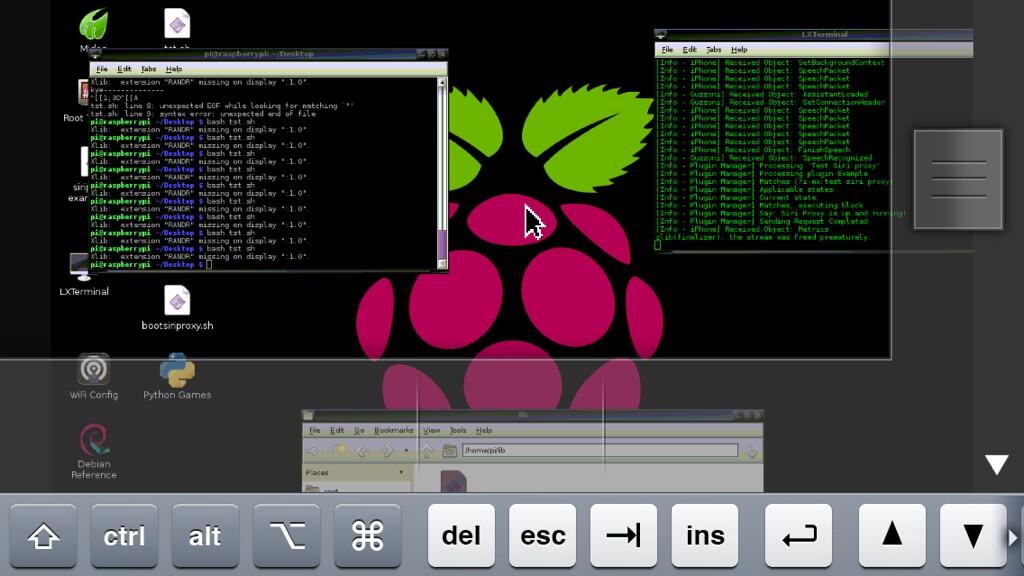
Another reason why VNC is Uber cool
I can connect to my pi from my iPad or iPhone!
Installing Siri proxy on your pi

The best, and probably easiest way would be to follow Elvis impersonator's instructions. I installed mine through SSH, one command at a time. This step is a little bit more complicated as you will have to take out the commands from the text file one by one. Nonetheless, it's pretty straightforward and you will find the complete list of instructions here:
Optionally you can set up your raspberry pi to start Siri proxy on boot. Once again, just follow Elvis impersonator's instructions:
Personally I've not set my Siri proxy of to start on boot. I kind of like having the terminal window showing me the output so I can occasionally check up with what's going on. If you if you choose to start your Siri proxies this way,  you will have to do it at the desktop level. Connected using VNC and run root terminal. In my case, for some reason it does not remember the path to the install, I simply have to rerun the following three commands in the root terminal to start the server.
  • [[ -s "/etc/profile.d/rvm.sh" ]] && . "/etc/profile.d/rvm.sh"
  • echo '[[ -s "/etc/profile.d/rvm.sh" ]] && . "/etc/profile.d/rvm.sh" # Load RVM function' >> ~/.bash_profile
  • siriproxy server

Modifying the example plug-in

about to go through the details of how to go about modifying or creating your own plug-ins. I believe that is a project for you to figure ;-). However, I did create a little auto hotkey script which will make the process somewhat easier.

My goal was to allow myself to use my Windows environment to use the actual modifications to the example plug-in script. Doing so would give me full access to my voice control,and other accessibility features. Not to mention a nice editor. You can download my autohotkey script here:
This script is just a convenient way to send a final from my Windows desktop to a raspberry. In order for to work you will need to have pscp.exe installed which of to download from the same place you  downloaded PUTTY 


  1. In the first box, this is where you want to send a file. Specify as root user. type in the full path.
  2. The second box is the file that you want to copy to the raspberry pie. Press the select button, go find your file.
  3. in the final box use the select button to specify where you downloaded pscp.exe
  4. modify your source file, save it then press send it. This will copy the file onto your pie.
I created this only has one way send to pi because I don't expect have to copy files back from my pie , very often, if at all.

Conclusion

This should be enough of the pieces to get to well on your way. Goal here wasn't easy tutorial but more to show you where to find hold the parts. I'm finding it surprisingly easy to work with the pie in this manner. So if your voice is still strong in your house I need/use for Siri proxy, a raspberry pie is a relatively inexpensive, not overly complicated and very effective way to get it set up.

Thursday, 30 May 2013

Dealing With Sleepiness & Fatigue

One of the unfortunate symptoms that ALS often provides is fatigue and sleepiness. For me this can often be extremely annoying as it usually starts by a round of pretty intensive yawning, which tends to cause for me some rather painful and unpleasant cramps in my neck and jaw. When these happen, there's nothing I can do about it other than wait for them to go away… At which point I usually yawn a second time which perpetuates more cramping…

It is not always the type of fatigue that makes me feel like I need to take a nap, just drowsy and lower energy for an hour or so. But if those cramps I really want to avoid.

So one option is to take a stimulant to help plow through the fatigue. I've tried a couple different types, and here's what I find works for me:

Coffee has been a long-standing source of enjoyment for me, as evidenced in one of my first posts on this blog. There's just something about a good strong cup of coffee. I don't know if it's because I spent a number of years working at a volunteer fire station, where hanging around you'd have a cup of coffee and chat with the boys between calls… Or if it's more of a Pavlovian reflex to my very first serious girlfriend who worked at Starbucks (use your imagination).

Obviously, the active ingredient to help get through the fatigue is caffeine. It does give a relatively immediate kick, but it can also leave you with a crash afterwards. Also, you probably don't want to drink too much of it as it is acidic and other some circles of thought, having an acidic pH in your body can contribute to chronic illness.

If nothing else, too much coffee can make your stomach feel acidic and too much coffee as a diuretic which can cause dehydration and possibly leave you with caffeine headaches. So I usually limit my coffee intake to just a couple cups a day of espresso. Usually in the morning.

A couple coffee made his home is relatively inexpensive. However due to my dexterity limitations, I'm using an nespresso machine which puts the cost per espresso at about $.63 Canadian.

Dealing with this illness review with very few options as there are no treatments. So I like most people in my situation taking huge collection of vitamins trying to slow the progress down anyway I can. One of these that recently added is Pamax ginseng.

Ginseng is another form of stimulants, but it also has antioxidant properties which is supposed to be good for your general health. One of the theories that exists under a more holistic schools thinking is that ALS causes its damage through oxidation and free radicals. Ingesting antioxidants such as ginseng are supposed to help prevent this type of damage.

At the moment I'm taking one tablet with my vitamins and morning, and on occasion to more in the afternoon when I'm having one of my bouts of fatigue. So far I've not found the ginseng terribly effective with the fatigue. Perhaps I'm not taking enough. Also I do find that it is much slower to have an effect than caffeine alternatives. Not to mention that taking ginseng in pill form provides no actual comfort or enjoyment. It's completely tasteless. For some of you dealing with ALS, swallowing can no doubt be a problem. That said these capsules are easy to pop in and add to whatever liquid you are able to consume.

Individually each pill is not very expensive, and prices for ginseng range quite widely. That said, so does the potency. Be sure to check the label.

There is the huge world of energy drinks out there and there's no way I can, or intended to try all of them. But I have on occasion tried a red bull. It's essentially a form of soda, with a sweet and bitter taste. It tastes okay, not great my opinion but okay. The nice thing about over coffee, this is something that you drink cold making it much more appropriate on hot days.

Red bull does have some interesting ingredients, and you can read about them in more detail here. Here are a few points of interest:

Caffeine: Again would give you the kick and has a pretty immediate effect.

B vitamins: this is something that's supposed to be good and nourishing for your nervous system. It also gives a little more staying power to the levels of energy. As a matter of fact my doctor has even prescribed to me vitamin B supplements.

Inositol: A carbohydrate found in animal muscle reportedly can significantly reduces depression and panic attacks among others. However the dosage is apparently insufficient.

Personally, I don't drink much in the way of soda these days. So I tend not to drink red bull often. The times I have had it, I have noticed it to be pretty quickly effective, lasts for a reasonable period of time and did not give me the crash afterwards.

Cost about $2 Canadian per can.

I originally started taking the occasional five hour energy after reading about it from another patient with ALS in the patient's like me forms. For the moment I find this is the most effective form. However I will say it energy doesn't seem to last quite five hours. Nonetheless it is plenty sufficient to get me through the around the fatigue.

There's a number of flavors, but here in Montréal I've only found two. Orange and Berry. For the orange, I don't particularly like the taste. But then again that's not why I'm drinking it. It will deliver pinch. I find the orange tastes excessively artificial for my liking. However, the Berry blend I find is actually quite good.

It's has some ingredients in common with red bull such as caffeine and vitamin B blend. It does however have a much higher concentration vitamin B. You can read more about the ingredients here. Again, here is some of the ingredients of note.

Vitamin B concentration: These levels are quite high and can result in the niacin flush. This is also what gives father energy some of its staying power. As part of this is the folic acid, which is another supplement my doctor has also prescribed. Folic acid, or folate, helps produce and maintain new cells in our bodies.

Caffeine: again, what gives it its immediate kick

Glucuronolactone: It has been shown to reduce sleepiness(see the footnote, not evaluated statement by FDA).

Phenylalanine:  sold as a dietary supplement to combat pain and depression. It actually works inside the body with tyrosine to produce dopamine, adrenaline, and build skin pigmentation.

When I'm really having a bout of fatigue, and absolutely need to stop yawning I find five hour energy is the most immediately effective. The nice thing is it's a very small container, making it very easily portable. So I'm out with the wife and kid, we can usually keep one with us. Now that being said, the way it's packaged is impossible for me to open on my own. It is covered in a vacuum sealed plastic buckle up and over the lid. This is impossible for me to remove on my own.

Each small bottle costs between $2 and $2.50 Canadian.

Now, before running out and buying a bunch of energy drinks to solve all your ALS related energy problems. Keep in mind that they do come with a health warning and can have some unpleasant/undesired side effects. Please read this link for more information.

In my case, I have found that excessive energy drinks such as these can sometimes promote the feeling of anxiety and from physical standpoint aggravate my fasiculations. Making me twitch a whole lot more. Which intern makes me anxious.

So please keep this in mind, and consume these types of drinks sparingly. Not to mention, to consider the time of day before taking any it is. Having a five hour energy at 10 o'clock at night might not be in your best interest ;-)

Thursday, 16 May 2013

Accessible Plates


One of the projects I've been working on for some time with my occupational therapist was to find some decent plates that worked well for me. This has, surprisingly been far more difficult than one would've expected.

Stay still dammit! I'm trying to eat!
Sure, there is an entire world of disability/accessible plates and bowls. But finding good ones that I liked was not easy. Most of what's out there is either small, made of plastic or not that beneficial and really makes me feel disabled. I still have a very healthy appetite and eat a large portion, so small plates don't work for me. Plastic plates are light and the slide all over the place and I already have enough problems trying to get food in my face. I don't need to chase it down anymore than I already do.

Probably about a year ago when we first started looking at better plates and bowls for me, my occupational therapist gave me a couple samples to try. One that particularly liked was steelite plate. So after using this plate for a few months and having increasing difficulties with regular plates, I decided that I would like to get some more of these plates rather than just one. I asked my occupational therapist for more.She told me that the only had one on hand, and couldn't remember where it came from. Nonetheless I said these are the ones I wanted.

Over the course of several months I was repeatedly told that she was unable to find them and that they were likely discontinued. So one day about two months ago she when asked about the progress on the plates, she explains this again and she says that she will keep looking on her side but that I could also go try a few stores but that she would need a moment to call one of her colleagues to get the names of the stores.

"No problem I say" after all I expect the names of specialty.

She makes a phone call to her coworker speech from in order to and comes back with a list of stores. I wait patiently while she's on the phone, she comes back with:  Bowering, Sears, the Bay, the linen chest, Stokes and of course… Canadian tire. Yes, you read that right. A list of the most common places to buy plates in Canada, possibly even North America.

While I stare at her for a moment completely dumbfounded she grabs a piece of paper and proceeds to write the stores down for me. Okay, now she's insulting my intelligence. I honestly felt like I'd walked into a specialty bookstore asked for the first edition copy of Don Quixote and the reply is "have you tried the public library?" I come to see these experts in the hopes that they have access to resources that I do not have in order to expedite the process in acquiring the adaptations and devices that they need.

Not to mention that having ALS means I don't have the mobility, energy nor time to race all over town to track this down myself. It was my understanding that's why we have an occupational therapist as rehabilitation facility.

AAAAAANYWAY… Enough venting about that.

This frustration sent me on an intranet quest. Through the appropriate use of Google I was able to quickly find a few suppliers. The first ones were unfortunately all in the UK and Europe. They were willing to ship to me in order, but because of the distances involved the order would've had to be a little larger than I had hoped and the shipping costs were, well. Expensive. Here's a couple of the links I found:
Through a few more manipulations of Google, I contacted the North American steelite supplier, a gentleman named Gary who was extremely kind and helpful. They went on to explain that these plates are not available through the distributor as individual units. However they can be ordered by the case. It turns out a case is not terribly unreasonable, especially if you can share the order with someone. The plates come in two sizes. 8 1/2 inch and 10 a quarter inch.

Through discussions with the distributor, here's what I was able to acquire:


What I particularly like about these plates is that they are ceramic like any other plate. Because of this I don't feel like I'm using specialty plates that often. They're heavy and durable. From what I understand they were actually intended for old age homes. They have a nice gently curved been raised age that's not too high and works very well for helping push the food back onto your fork or spoon.

At first, I wasn't sure I'd find a whole bunch of benefit to having plates of different sizes. But I actually do. Some meals are much easier to manage and the smaller plate. For example when eating pasta, I'm less likely to drag my knock on us through my food to push up against the far side of the plate.

Also, one of the great things about having plates of different sizes and colors like this is a help immensely with our coping strategy for a three-year-old son. From time to time we take one of the smaller plates for him two years so he can now have a big boy plate "just like dad" we are hoping to take some of the fear out of the situation with this. He is old enough that he starting to ask about questions.

The coffee mug is a great idea as well, having handles on both sides. It weighs about the same as any other coffee cup, but unfortunately due to the specifics of how my hands are starting to flatten out and deform this cup is proving not be as beneficial as I had hoped. I will say however it is easier for me to transfer coffee from the kitchen to where I sit. Unfortunately it's not really much easier to drink from for me. Mind you that's about the same for any cup these days, I'm having to use a straw a lot.
Yup! Great product.

On the whole, I'm very pleased with these plates and the cup. They're the best thing I found for me to date. There are little bit hard to come by, but worth the effort. You can contact the gentleman who helped me here Gary gbennington@steelite-canada.com or you can go through their corporate site which is where I started.

You can view the whole line of the Rio steelite products here in their brochure.

Tuesday, 14 May 2013

A Little Hack for Dragon Naturally Speaking


I used Dragon NaturallySpeaking a fair bit… Well, a lot… Okay, to be honest just about every time I'm in front of the freaking computer! For the most part, it works quite well and does when they needed to do. However it does have one nagging irritation for me. By default, you cannot set a default user profile to load when you restart your computer.

As we all know, computers (especially Windows) need the occasional reboot. Not having my Dragon dictation online when the computer boots, well is kind of annoying. Especially because having hands that don't work so well and right clicking often being challenging these days I have to go but futzing with the mouse, right-click the task manager icon and select the user profile I want load.

I found a neat little way to force Dragon to load a specific user profile on reboot. Here's how you do it:

open the Dragon in the start menu under startup
start menu --> Start up --> Dragon NaturallySpeaking Quickstart
right-click and edit the properties
add the following the target (you must delete any existing flags and replace it with this)
/User "<YOUR USERNAME>"

Doing so should tell Dragon to load this profile whenever Windows restarts. Be sure to pay special attention to the placement of the quotation marks.

Monday, 29 April 2013

Help with the Dental Hygiene

but Elmo has no teeth?
These days it's becoming a bit of a challenge to brush my teeth. I've long since moved over to an electric toothbrush, but to get in the toothpaste onto the brush has become quite an adventure.

Whatever usually do is rest the toothpaste on the counter place my left hand on the to, and try to line up the toothbrush with my right hand and then squish it… Hoping it wouldn't get everywhere. It turned into quite a balancing act. Backspace and this was getting even more difficult as the to both Tuesdays with getting down to about half full.

So started to look around online for an automatic toothpaste
dispenser. Finding one was actually pretty easy. There are several types to choose from on Amazon. But I found a pretty good one for around about C$15. Unfortunately, this particular project does not seem to have a specific name in the boxes shipped in is all written in Korean. That said, you should double to find this particular item (left) pretty easily.
Yep, I'm not the
only one drooling…

The toothpaste dispenser is designed to attach to the wall/mirror using 3M double-sided tape. This works okay, but in my case I have a bunch of little glass tiles where I've mounted it and sticks less well to those. Probably also because my three-year-old likes to pull it off the wall…

Anyway, is designed to work by screwing in your tube of toothpaste from the top and is a little lever in the whole that you push with toothbrush. This squeezes the tube of toothpaste and opens a valve dropping a portion of toothpaste (hopefully) on the brush. The first week or two, this didn't work out too terribly well. I found the amount of toothpaste delivered insufficient and often it was quite messy. In part because the toothpaste was either not dropping properly or because of my shaky hands would dump it all of the dispenser.

However, I seem to have gotten the hang of it… I guess there is apparently a bit of a technique for people with shaky hands and is working quite well right now. It does however still create a little bit of a mess.

Me and my boy!
… No, not really…
Also, if your hands are about as functional as mine. Meaning you have difficulty holding her hands up, I found that sticking it to the wall, flush to the counter works quite well. This makes it easy for me to use both hands, sliding them first the dispenser. This also makes it much easier for me to press the lever at the back of the dispenser. Thus getting a more appropriate amount of toothpaste. This also stabilizes the shakiness of my hands, so I make less of a mess.

Pro:

  • much easier than the toothpaste tube/toothbrush balancing act
  • reasonably well controlled portion of toothpaste
Con:
  • can be a bit messy
  • double-sided tape can wear out and limit what you can stick it to. My options were the glass tiled wall or the Wood Cabinet. I'm pretty sure it would've ruined that
Cost: I paid about C$15 with shipping. Pretty good price.

You can check out an example of it in action here. This is just an example I found on YouTube, this is not my house ;-) Honestly though, given the cost it's really well worth the try.

Wednesday, 17 April 2013

Siri proxy & Home Automation

Well crap.
That was only a matter of time…
If you been following my blog for some time, will no doubt noticed that this is not my first attempt to create some voice control for my home automation system. However at the time of my previous attempts, I was not aware of the Siri proxy, which is pretty awesome once you get working.

I first became aware of Siri proxy being used to drive home automation system while reading one of my favorite websites, life hacker. The article talked about Elvis impersonator who it created a plug-in to open and close his garage door and set the thermostat. Needless to say I found this to be pretty amazing, and far superior to anything I've attempted so far. So I went about looking into how to get this set up.

I've been wrestling with this for some time. First off, I didn't know anything about Ubuntu nor what would be the best way to install it. Particularly because of my dexterity limitations. Anyway, check out the results!

I have to say, I'm really quite pleased with the results. It was well worth the effort.

So what was required to get this up and running?

As mentioned, I had to first figure out how to work with Ubuntu and what was the best way to install it. For the time being, I'm running a bootable partition on my desktop PC. I am going to try to get a old PC/laptop running it 24/7. I also tried running it through virtual box. While the installation went smoothly, I had some difficulties getting Siri proxy up and running.

The and to create the functions for turning the light on/off or locking/unlocking the door, I had to figure out a little bit of Ruby script. Fortunately, modifying the sample plug-in is pretty straightforward and it's very easy to insert console commands to it, and fortunately I had already figured these commands out from my previous attempts…

If you would like to give it a try, here's the links to all of the resources you will need:
Even though Siri proxy is working super well for me, they do say that it is in an alpha state development now. Meaning it does have occasional issues and going through the proxy server, some of the voice commands or functions may not be quite the same/functional.

For example the open app command still does work for any of the non-default applications. However it seems to not recognize programs like contacts or music. This also means that when asking to play a particular song or album e.g. "Siri, play album X" the proxy does not recognize this. Saying I do not have that album or artist.

All in all, swapping one level of convenience for another. Not too big of a deal. Easily reverted by resetting your Wi-Fi IP.


So what's next? Well I've ordered a few more light nodes and those of the most immediately useful to me. I would also like to add some thermostat control, however my house is kind of badly designed for that, making it cost prohibitive. (I have a number of baseboards on independent thermostats in the same room… Stupid)

Troubleshooting:
If encounter a few issues about trying to get Siri proxy up and running, try the following:
  1. I found that the DNSMASQ may be interfering. You can try killing it with terminal command: killall dnsmasq
  2. If your server IP is showing 0.0.0.0 open .siriproxy/config.yml and set the IP which should be in the first or second line of the file to whatever the IP is for your machine
  3. Apparently there has been some issues with Siri proxy and Ruby DNSnot playing nice together…
    • Edit line 56 in /home/<username>/.rvm/gems/ruby-2.0.0-p0/gems/siriproxy-0.5.3/lib/siriproxy/dns.rb to look like the following: match(/guzzoni.apple.com/, Resolv::DNS::Resource::IN::A) do |transaction|
    • Then perform siriproxy bundle
  4. iPhones are known to "leak" data over the cellular network even when connected to Wi-Fi. Try turning off cellular data.
I performed these three steps, and Siri proxy consistently runs perfectly. Thanks to Elvis Impersonator for most of these tips!

Woo hoo!
It's apparently also possible to connect an IR blaster to my home automation system. This would then give me voice control over my TV, air conditioner and other IR devices (awesome!). This is up from more investigation…

Also in the process of trying to find a machine I can use for dedicated Siri proxy server. Raspberry_pi is an option, and you can find more about those on Elvis impersonator's page. I have to look into it a bit ourselves first to see if it's the best option for me.

One of my favorite things about the Siri proxy server is, as you see in the video I can unlock my door just by using my voice. As I walk up to my house, I reconnect to my Wi-Fi and the Siri proxy server, all I have to do is tell the door to unlock. Which is really great for me as I can no longer manage keys.

So all in all I found getting this up and running was challenging, but well worth the efforts.


I would just like to take a second and give a shout out to Elvis Impersonator who contacted me out of the blue with a generous offer for help and advice. Be sure to check out his YouTube page and some of the other magic that can be done with Siri proxy and a Raspberry_pi!


Additional Note (added 29th of July 2013)

be sure to check out the related blogs comparing the desktop installation to using a raspberry pi
http://pikespals.blogspot.ca/2013/06/raspberry-pie-versus-desktop.html

Monday, 8 April 2013

A Little More Humor…

Imperial versus Metric…

Every two weeks I get some help to come to the house to help to prepare some meals in this usually works out okay. But once in a while there are some things that just don't seem to be understood… While making a particularly good ratatouille, here's a sample of the conversation I had the other day:

Me: "we need to slice all the vegetables to be about 3 mm thick."

Helper: places the knife on the vegetable and shows me where she thinks to cut, which is about a centimeter. Asking "like this?"

Me: "no, recipe calls for about 3 mm that's about a centimeter"

Helper: "I don't know what a centimeters…"

Me: thinking to myself, okay she must know the Imperial system. "Recipe actually specifies 1/16 of an inch" (okay, I know that's about half the size of 3 mm…)

Helper: "oh, like this then?" She places the knife on the vegetable ready to cut about a quarter of an inch thick.

Me: "no, the recipe says 1/16 of an inch"

Helper: she repositions the knife again, this time to about half an inch. "How about this?"

Me:… Okay, she apparently doesn't know the Imperial system either…
/FacePalm


Battling with the Car Seat…

Every weekday, I have a helper come by the house to assist me in getting my son from daycare. I can still drive there and back, but I have difficulty getting him ready and I cannot manage the car seat. I don't know what it is, but there seems to be an ongoing battle with my child's car seat when we pick him up from daycare. Helpers often just don't seem to understand how it works. 

The following is an actual conversation that happened, you can pass your own judgment…

Me: I sit down in the driver seat waiting for my helper to attach my son. I mistakenly assume he knows what he's doing.

Helper: fumbling with the straps for a few minutes he actually says to me "well, I can't figure this out. I'll just hold him in the car seat."

Me: completely dumbfounded I replied "the hell you will. We may only be going a few blocks away, but you will do it up properly"